The Practical Guide to Publishing Successful Search and Find Books on Amazon KDP
The world of Amazon Kindle Direct Publishing (KDP) offers an incredible opportunity for creators, educators, and entrepreneurs. Among its most popular and evergreen niches is the creation of children's activity books. Specifically, Look-and-find Search and Find Books KDP represent a category with immense potential. These books, designed to entertain and educate young minds with activities like "I Spy," matching shadows, and spotting differences, are consistently sought by parents and caregivers. However, diving into this market without a strategic approach is a common pitfall. Success isn't just about having a cute idea; it's about executing it with professional quality and market awareness.
Understanding the Product: More Than Just Hidden Pictures
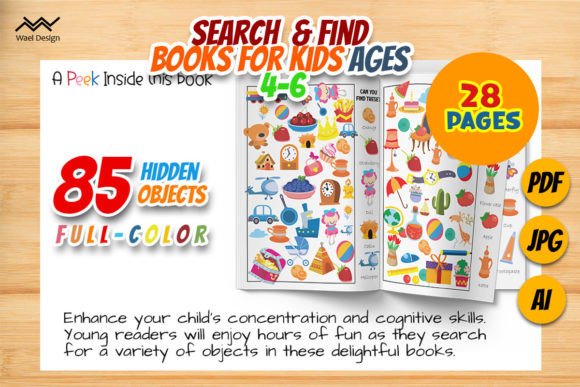
When people consider creating a search and find book for kids aged 4-6, they often focus solely on the activity pages. They envision a book with 85 objects to find and think the work is done. This is a fundamental misunderstanding. A Look-and-find Search and Find Book is a complete, polished product. The interior activities must be expertly crafted, but so must the cover, the file formats, and the technical specifications. A typical quality product bundle, as mentioned, includes an Adobe Illustrator template, print-ready PDFs, and keyword research files. This comprehensive approach ensures you aren't just creating content; you're building a publishable asset.
Critical Mistakes to Avoid in Your KDP Search and Find Book
Many aspiring publishers encounter hurdles that diminish their book's quality, marketability, and ultimately, their sales. Let's explore some of the most common errors and how to sidestep them.
Overlooking Print-Ready Specifications
A creator might design a beautiful activity page but save it as a low-resolution JPEG or use incorrect dimensions. The requirement for American letter size (8.5 x 11 inches), 300 DPI resolution, and CMYK color mode for print is not arbitrary. Ignoring these details leads to a physical book that looks blurry, colors that print incorrectly, or margins that are cut off. This directly affects customer satisfaction—a parent receiving a poorly printed book will not buy from you again. Your approach must be print-first. Always use the provided template or set your document to the exact dimensions and resolution from the start.
Neglecting Professional File Formats and Fonts
The promise of "no problem with the font used in the interior" in a quality template is a crucial detail beginners miss. Using common system fonts or unusual decorative fonts can cause rendering issues during KDP's upload process. A professional Adobe Illustrator Ai template embeds graphics and uses fonts that are either licensed or converted to outlines, ensuring consistency. If you attempt to build a book from scratch in a simple word processor, you risk encountering font errors that delay publishing or result in a rejected file. The better choice is to utilize a professionally prepared template as your foundation.
Underestimating the Importance of Keyword Research
Receiving "03 Files XLS Keywords" is a gift many undervalue. Simply listing your book as "Kids Activity Book" on KDP is a recipe for invisibility. The Amazon marketplace is driven by search. Parents search for "seek and find books for kids 4-6," "I spy activity book," or "spot the difference preschool." Failing to use these precise, researched keywords in your title, subtitle, and description means your book won't appear to its target audience. You should study the provided keyword files and integrate those terms naturally into your book's metadata, avoiding repetitive stuffing.
Choosing a Template: What to Check Before You Commit
Many creators seek downloadable templates or bundles to start their project. Before you download or purchase any resource for your Look-and-find Search and Find Books KDP project, conduct a simple audit.
- Verify the Contents: Does the bundle explicitly include the interior template, cover file, and keyword data? A missing cover template means you must design one yourself, which requires additional graphic design skills.
- Check the Page Count and Activity Variety: A book promising "85 objects" should logically span enough pages to make that enjoyable. Ensure the activities are varied—matching shadows, spotting differences, and hidden object scenes—to keep a child engaged throughout.
- Assess the Design Quality: Preview the PDF content. Are the illustrations clear, age-appropriate, and professionally drawn? Cluttered or amateurish artwork will not compete in the market.
- Confirm Technical Readiness: The phrase "100 Ready for printing" should mean all pages are properly formatted. Open the sample files to check dimensions and resolution if possible.
Taking these steps ensures you invest in a foundation that supports quality, rather than a set of files that create more technical work for you.
A Better Approach: Building on a Solid Foundation
The most efficient path for a beginner or even a seasoned professional is to start with a complete, high-quality resource bundle. For example, using a provided Adobe Illustrator template allows you to focus on customization and adding your unique touch, rather than solving basic design puzzles. You can adapt scenes, change color schemes, or add thematic elements (like a dinosaur or ocean theme) while all the technical parameters remain intact.
Similarly, using the supplied keyword research gives you a market-informed starting point. You can expand on this data by looking at successful competitor books to see what terms they use, but the core research is done for you. This practical approach saves time and reduces the risk of fundamental errors, letting you channel your energy into marketing and building your brand, rather than fixing file errors.
Realistic Expectations for Satisfaction and Sales
Creating a single book is a great start, but understanding the KDP ecosystem is key. A common overlooked detail is the need for consistency and series potential. A successful search and find book can lead to a series—perhaps with different themes or difficulty levels. The initial product bundle you choose should therefore be adaptable. Furthermore, customer satisfaction hinges on the physical product's quality. A book that is 100 Ready for printing and produced with 300 DPI results in a crisp, vibrant activity book that feels worth the price. This builds positive reviews, which are essential for long-term visibility on Amazon.
Ultimately, publishing a Search and Find book for kids 4-6 on KDP is a rewarding venture. By avoiding the common pitfalls of technical negligence, poor asset preparation, and weak market research, you position your creative work for success. Begin with a professional template, adhere to print specifications, leverage smart keyword data, and always prioritize the end-user's experience. This constructive, solution-focused methodology turns your idea into a product that delights children, supports early learning, and builds a sustainable publishing endeavor.