The Not-to-Do List Priority Tracker: A Practical Guide for Productive Workflows
In the world of productivity, we are endlessly encouraged to build better to-do lists. Yet, an often overlooked but profoundly effective tool is its inverse: the Not-to-Do List. When combined with a priority tracker, this concept transforms from a simple reminder into a strategic system for behavioral change and focused execution. The Not-to-Do List Priority Tracker isn't just about avoiding bad habits; it's a deliberate process for clearing mental clutter, protecting your time, and ensuring your energy is directed toward your true priorities.
Understanding the Role of a Not-to-Do List in Your Process
Every productive workflow consists of two fundamental actions: doing and not doing. The doing is managed by your task lists, project plans, and calendars. The not-doing, however, is typically left unmanaged, leading to the slow accumulation of time-wasting habits, reactive behaviors, and low-value activities. A formal Not-to-Do List creates a boundary. It is a pre-commitment device you reference before you begin your workday, enter a meeting, or start a creative session. It fits into your broader process as a filter, sitting upstream of your execution phase. By defining what you will not engage with, you automatically sharpen and prioritize what you will.
For professionals, creators, and entrepreneurs, this is crucial. It prevents the common pitfall of being busy but not effective. For instance, a marketer might list "not checking social media metrics more than twice daily" or a freelancer might commit to "not answering non-urgent client emails during deep work blocks." This list interacts directly with other tools—your calendar respects the blocked time, your priority matrix highlights the high-impact tasks you *should* be doing instead, and your project management platform becomes a space for focused action, free from the distractions you've pre-defined.
Integrating the Priority Tracker with Behavioral Boundaries
A standalone Not-to-Do List is powerful, but pairing it with a priority tracker creates a feedback loop essential for long-term use. The priority tracker—be it a simple list, a matrix, or a ranked system—defines your positive objectives. The Not-to-Do List defines the obstacles to those objectives. Using them together turns abstract goals into concrete daily rules. The workflow integration is straightforward: each planning session (weekly, daily) involves reviewing both. First, identify your top 3-5 priorities for the period. Next, ask: "What habits or actions would most likely derail these priorities?" Those items become your Not-to-Do entries.
Consider a small business owner preparing for a product launch. Their priority tracker highlights tasks like "finalize landing page copy" and "coordinate with manufacturing." Their accompanying Not-to-Do List might include: "not getting drawn into unrelated administrative paperwork today," "not allowing meeting discussions to veer off into non-launch topics," and "not reacting immediately to every minor critical comment on the draft." This combination ensures effort is not just directed, but also protected. The system enhances efficiency and consistency because it addresses both the proactive and defensive aspects of work.
Practical Implementation: Building Your System
Implementation begins with identification. Look at your past week. Where did your time leak? What emotional reactions wasted energy? What small, repeated habits delayed important work? Common entries might be "not saying 'yes' to last-minute requests without consulting my calendar," "not starting the day by browsing news sites," or "not using filler words like 'um' in client presentations." The key is specificity. "Not procrastinating" is too vague; "not opening my inbox until my first planned task is complete" is actionable.
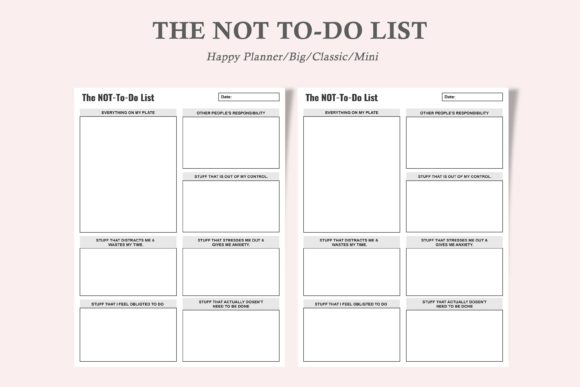
For digital or printable planner inserts, like those designed for Happy Planner Classic, Mini, and Big sizes, usability and organization are paramount. Having a dedicated, minimalist page for your Not-to-Do List alongside your priority tracker reinforces the habit. The physical act of printing a new page as needed—or editing a digital PDF—adds a ritual of renewal and commitment. Place this insert at the front of your planning section for the day or week, so it is encountered first. Its professional, ink-friendly design should serve clarity, not distraction; the tool itself should embody the principle of removing clutter.
Workflow Examples Across Different Roles
The application of a Not-to-Do List Priority Tracker adapts naturally to various roles and stages of a project.
For an Educator During Curriculum Planning: The priority tracker lists "develop assessment rubric" and "source primary materials." The Not-to-Do List might include "not revising the entire syllabus structure (stick to the current block)," "not searching for perfect, exhaustive resources (curate sufficient ones)," and "not checking personal messages during the 2-hour planning block." This maintains focus during the preparation phase.
For a Blogger During the Creative Process: Priorities are "write draft of sustainability article" and "select primary images." The Not-to-Do List becomes: "not editing for perfect grammar during the first draft flow," "not comparing my topic to five other bloggers' posts before finishing," and "not switching to SEO keyword research mid-draft." This protects the fragile creative execution phase from premature quality control and competitive anxiety.
For a Project Manager During Execution: With priorities like "monitor milestone deliverables" and "prepare stakeholder update," the Not-to-Do List could state "not solving team members' problems they can solve themselves (guide only)," "not updating the project timeline with every minor change (batch updates)," and "not holding ad-hoc meetings without a clear agenda." This ensures leadership time is spent on oversight and communication, not on micro-management.
Factors for Long-Term Success and Quality Control
Consistency in using this system yields its greatest benefits. Like any productivity tool, its value compounds with regular review. A practical tip is to tie its review to your existing planning rituals. Each Sunday night, when you set weekly priorities, also set your weekly Not-to-Do items. Each morning, a quick glance at both lists sets the tone. Over time, you'll notice patterns—certain items may become permanent, as they guard against your chronic weaknesses; others will be project-specific.
Quality control in your work is often less about adding more checks and more about removing error-inducing behaviors. A Not-to-Do List directly contributes to this. For example, a publisher's list might include "not skipping the final proofread cycle even if tired," effectively enforcing a quality step. An entrepreneur might list "not making a financial commitment without the 24-hour reflection rule," introducing a deliberate pause that improves decision quality. The list acts as a pre-defined policy, reducing the cognitive load and emotional bias present in the moment.
Smooth Integration into Your Existing Routine
The goal is seamless integration, not another burdensome system. Start simple. Use the printable inserts available in multiple sizes—choose the Big 8.5" x 11" for desk-bound work, the Classic 7" x 9.25" for a standard planner, or the Mini 4.5" x 7" for portability. Their compatibility with popular planner systems means you can add them without overhauling your setup. Begin with just three items on your Not-to-Do List and three priorities. Track them for a week. Notice how often you refer to them and how they influence your choices.
The interaction with other methods is organic. This list complements time-blocking by defining what you won't do during those blocks. It supports the Eisenhower Priority Matrix by explicitly naming the "Distractions" and "Interruptions" you will avoid, so you can focus on "Urgent & Important" tasks. It works alongside digital tools like task managers—your Not-to-Do items are the meta-rules governing how you use those apps. The design of the tool itself, being minimalist and ink-friendly, encourages print-and-use simplicity, promoting consistent long-term use without fuss.
Ultimately, the Not-to-Do List Priority Tracker is a process for conscious omission. In a culture of endless addition, it provides a structured way to subtract. It helps you not only plan your work but also plan your restraint. By defining your boundaries with the same seriousness as your goals, you create a workflow that is not just productive, but sustainable and intentional. The outcome is clearer focus, protected time, and the gradual eradication of the small habits that quietly undermine your biggest priorities.